
Nothing kills a gaming session faster than losing power mid-match. Whether you’re deep into a competitive ranked season or grinding through a campaign, a faulty Xbox power cord can bench you without warning. The frustration only multiplies when you realize there isn’t a universal cord that works across all Xbox models, the original Xbox, Xbox 360, Xbox One, and the current-gen Xbox Series X
|
S all demand different specifications. This guide cuts through the confusion and gives you everything you need to know about Xbox power cords: how to identify the right one for your console, spot trouble signs before they wreck your setup, and get back online fast.
Table of Contents
ToggleKey Takeaways
- Xbox power cord compatibility varies significantly across generations—Original Xbox, Xbox 360, Xbox One, and Xbox Series X|S all use different connectors, so purchasing the wrong cord can damage your console.
- Official Microsoft Xbox power cords ($40–$80) offer warranty coverage and guaranteed compatibility, while third-party alternatives ($20–$40) vary in quality and carry higher risk of overheating or console damage.
- Watch for warning signs your power cord needs replacement: physical damage, excessive heat buildup, intermittent power loss, or strange sounds/smells from the power brick.
- Before buying a replacement, troubleshoot by testing a different outlet, cleaning connection points, checking for bent pins, and trying a hard reset—these simple steps often reveal the real culprit.
- Purchase authentic Xbox power cords from Microsoft’s official store, Amazon (fulfilled by Amazon), Best Buy, or certified eBay sellers to avoid counterfeits and ensure reliability.
- Proper cable management—using Velcro ties, avoiding tight coils, keeping the power brick off the ground, and maintaining surge protection—extends your Xbox power cord’s lifespan and improves safety.
Understanding Xbox Power Cords: Types and Compatibility
Original Xbox vs. Xbox 360 vs. Xbox One and Series X
|
S
Not all Xbox power cords are created equal. The original Xbox used a bulky external power supply with a barrel connector. The Xbox 360 came in two iterations: the original 150W model and the later 175W version, both using a different connector than what came before. Move to the Xbox One, and you get a sleeker, smaller external power supply with its own proprietary connector.
The Xbox Series X
|
S generation changed the game again. The Series X uses a custom integrated power supply rated at 180W, while the Series S makes do with 100W. Neither uses the same connector as previous generations, which is why grabbing the wrong cord can literally cost you hundreds in replacement costs.
The key takeaway: never assume compatibility. An Xbox Series X power cord won’t work with an Xbox One S, and vice versa. Gamers have learned this lesson the hard way, often when they’ve already damaged their console trying to force the wrong cable to fit. Check your exact model before ordering any replacement.
Official vs. Third-Party Power Cords: What You Need to Know
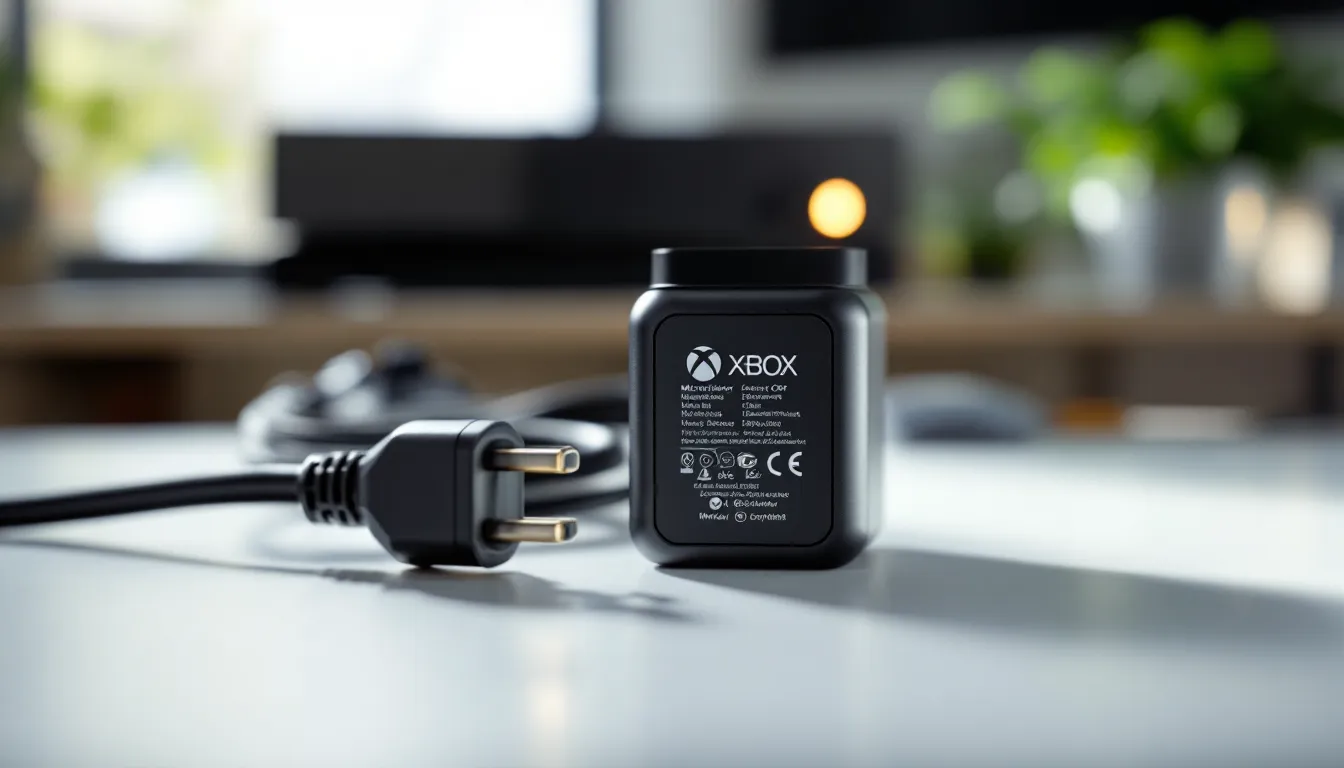
You’ll find two categories of Xbox power cords: official Microsoft products and third-party alternatives. Official cords are manufactured by Microsoft or licensed manufacturers under strict quality control. They come with warranty coverage and are guaranteed to match your console’s specifications exactly. The trade-off is cost, official cords run between $40 and $80 depending on the model.
Third-party cords, meanwhile, offer cheaper entry points, sometimes $20 to $40, but quality varies wildly. Some third-party manufacturers are solid and produce reliable products. Others cut corners on internal components, which can lead to overheating, sudden shutdowns, or worse, damage to your console’s power delivery system.
The safest approach is to go official when possible. Your Xbox console is already a significant investment: protecting it with a legitimate power cord is insurance money well spent. If you do consider third-party options, look for cords from reputable manufacturers with strong user reviews and certification marks (like FCC approval for US models).
Common Xbox Power Cord Problems and How to Fix Them
Identifying Signs Your Power Cord Needs Replacement
Your Xbox won’t always fail dramatically. Sometimes the warning signs are subtle, and easy to miss if you’re not paying attention. Here’s what to watch for:
Physical damage is the most obvious red flag. Check the entire length of the cord for fraying, cuts, or exposed wiring. Even small nicks can be dangerous and will only get worse with heat and flex. If the cord has been bent sharply or caught in a door, replacement is mandatory.
Heat buildup at the power brick or connection point indicates trouble. The cord should be warm to the touch but not hot. If it’s too hot to hold comfortably, unplug immediately and don’t use it again. Overheating is a precursor to failure and fire hazard.
Intermittent power loss is another telltale sign. Your console randomly shuts down, or the power light flickers even though nothing physically looks wrong. This typically means the internal connectors in the cord are corroding or loosening. A few more sessions and it’ll die completely.
Strange sounds or smells coming from the power brick shouldn’t be ignored. A faint buzzing is sometimes normal, but crackling, popping, or a burning smell means the cord’s internal circuitry is failing. Unplug it immediately.
Troubleshooting Steps Before Buying a New Cord
Before you drop cash on a replacement, run through these checks to confirm the cord is actually the culprit.
First, try a different outlet. Plug the console into a different wall socket or power strip. Occasionally, a faulty outlet or circuit is the real problem, not the cord itself. If your Xbox powers up fine in another location, replace or repair your outlet, not the cord.
Inspect the connection points carefully. Look at where the cord connects to the console and where it connects to the power brick. Dust and debris accumulate here and can cause poor contact. Use a soft, dry cloth (not wet) to gently clean the connectors on both ends. Sometimes that’s all it takes.
Check for bent or damaged pins. If the connection end has visible pins or connectors, look closely for bending, corrosion, or discoloration. Don’t try to straighten pins yourself, that’ll only make things worse. If you spot damage here, the cord needs replacement.
Try the “hard reset” method. Unplug the console from the power cord completely. Wait 30 seconds. Plug it back in and power on. This sometimes resets internal power management and clears temporary glitches. It’s a long shot, but it costs nothing and occasionally works.
Test with a different console (if possible). If you have access to another Xbox One S, Xbox Series X, or Xbox Series S power cord, borrow it and try with your console. If your console powers up fine with the loaner cord, your original cord is the problem. If it still fails, the issue is probably internal to your console, and you need professional support.
How to Choose the Right Replacement Xbox Power Cord
Checking Your Console Model and Power Requirements
Getting this step wrong is the most common mistake gamers make. Before you buy anything, identify your exact console model and its power specifications.
For Xbox One models, determine whether you have the original Xbox One, Xbox One S, or Xbox One X. They’re visually distinct, but if you’re unsure, look at the console’s physical dimensions or the spec label on the back. The original Xbox One came with a 130W power supply. The Xbox One S uses 100W. The Xbox One X requires 180W. Mixing these up will either not power your console or, worse, cause damage.
**For Xbox Series X
|
S**, the distinction is straightforward. The Xbox Series X pulls 180W and uses Microsoft’s proprietary connector. The Xbox Series X power cord is thick and distinctly different from the Series S, which only requires 100W. There’s no mixing them, the physical connectors literally won’t fit other models.
Find the label on your console or power brick. On the back or underside of your console, you’ll find a specifications label that lists the exact power requirement in watts. This is your source of truth. Write this number down before shopping. Don’t rely on memory or what you think your console needs.
Once you know your model and wattage, note the connector type. Is it a barrel connector, proprietary Xbox connector, or something else? Take a photo of the connection point if possible. This visual reference will help enormously when you’re shopping online or in a store.
Where to Buy Authentic Xbox Power Cords
Knowing what to buy is half the battle. Knowing where to get it safely is the other half.
Microsoft’s official store (xbox.com) is your safest bet for authenticity. Cords are guaranteed genuine, prices are fixed, and returns are hassle-free. Shipping is usually fast. This is the premium option, so expect to pay full retail price, but you’re buying peace of mind.
Amazon (seller: fulfilled by Amazon). Amazon sells official Xbox power cords, but be careful about third-party sellers. Stick to listings that explicitly say “sold and shipped by Amazon” to avoid counterfeits. Read reviews carefully, legitimate buyers will mention whether the cord works as expected. Counterfeit cords often have spelling errors in the product description or suspiciously low prices.
Best Buy stocks official Xbox power cords both online and in-store. The advantage here is you can see the product before buying and often return it in-store if there’s an issue. Best Buy also frequently runs sales, so you might snag a discount.
Retailer-certified sellers on eBay. If you’re hunting for a hard-to-find Xbox One S power cord or legacy model, eBay has them. Just buy from sellers with high ratings and return policies. Avoid listings that offer “bulk deals” or seem suspiciously cheap.
Avoid:
- Marketplace listings with no seller information or ratings
- Deals that are 50% cheaper than retail (that’s a red flag for counterfeits)
- Generic sellers located outside your region with no return policies
- Third-party Amazon sellers with low feedback scores
When your cord arrives, inspect it immediately. Official cords come with proper packaging, branding, and documentation. If the packaging looks cheap or misspelled, that’s a sign it’s counterfeit. Don’t use it, contact the seller for a replacement.
Cable Management Tips for Gaming Setups
A well-managed power cord setup improves both safety and aesthetics. Here’s how to keep your Xbox power cord organized without damaging it.
Route the cord behind furniture or along the baseboards. Keep it away from high-traffic areas where someone might step on it or a pet might chew it. Don’t run it under carpets, heat buildup and friction under a rug is a fire hazard.
Use cable clips or spiral wraps to bundle multiple cords together. If you have an Xbox, monitor, router, and other devices all powered up, grouped cords look cleaner and are easier to manage. Avoid using rubber bands or tight ties that can damage the insulation over time. Velcro cable ties are ideal because they don’t cut into the cord.
Leave slack in the cord. Don’t wrap it tightly around furniture or conduits. Bent power cords are stressed power cords, and stress leads to internal wire damage and eventual failure. A gentle coil is fine: sharp 90-degree angles are not.
Keep the power brick off the ground. Dust accumulation is inevitable on the floor, and a dusty power brick has to work harder to dissipate heat. Use a small shelf, desk, or elevated surface to keep it clean and cool. This extends the cord’s lifespan significantly.
Position the power brick away from your console’s vents. Xbox consoles have intake and exhaust vents that need airflow. If the power brick blocks these, your console runs hotter, which stresses the entire power delivery system, including the cord. Keep a few inches of space around all vents.
Label your cords if you have multiple consoles. Use a small label maker or electrical tape to mark which cord belongs to which console. It’s easy to grab the wrong one when you’re setting up or troubleshooting, and a single mistake can damage your console.
Invest in a quality power strip or surge protector. A power strip with surge protection adds a safety layer that prevents voltage spikes from damaging your cord and console. Look for strips with at least 4 outlets and a 2000-joule surge rating. Reviews from PCMag validate that surge protection is critical for gaming setups with multiple high-power devices.
Never coil the cord tightly around the power brick. Some power bricks have grooves or slots for cord management. Don’t use them. The cord can overheat when wound too tightly, and wrapping it around the brick stresses the internal wires. Keep it loose.
Safety Considerations When Using Xbox Power Cords
Preventing Power Cord Damage and Extending Lifespan
Power cords are engineered to last, but they’re not indestructible. Here are the best practices to keep yours functioning safely for years.
Avoid moisture at all costs. Don’t plug your console into an outlet near a sink, bathroom, or humid area. If water gets inside the power brick or connections, you risk electrocution and permanent damage. If your cord does get wet, don’t use it. Dry it completely (at least 48 hours in a dry place) before attempting to plug it back in, or just replace it.
Don’t pull on the cord to unplug it. Always grasp the plug itself, not the cord. Yanking the cord stresses the internal wires at the connection point and causes the internal wires to fray over time. This is especially true for the cord end that plugs into the console.
Keep the power brick and cord away from heat sources. Don’t position your console near a radiator, space heater, or direct sunlight. Extreme heat degrades the rubber insulation and internal components. The power brick should feel warm, not hot. If it’s hotter than that, unplug it and let it cool.
Never modify or repair the cord yourself. Covering damaged insulation with electrical tape might seem like a quick fix, but it’s a temporary band-aid on a safety issue. Damaged cords need replacement, not repair. The cost of a new cord is insignificant compared to the risk of electrical hazards or console damage.
Check your outlet regularly. If an outlet feels warm to the touch, smells burnt, or shows scorch marks, don’t use it. That outlet is failing and will damage anything plugged into it. Have a licensed electrician inspect and repair it before using it again.
Don’t use extension cords permanently. Temporary extension cords for testing are fine, but don’t leave your Xbox permanently plugged into an extension cord. Extensions add resistance to the power flow and generate heat. If you need an extension, use one rated for high-power applications (at least 12 AWG gauge).
Unplug during storms. If lightning is near or a storm is approaching, disconnect your console and power cord from the outlet. Surge protectors help, but unplugging entirely is the only guaranteed protection against lightning-induced damage.
Replace the cord immediately if you suspect damage. Don’t “wait and see” if a damaged cord will still work. The moment you notice fraying, discoloration, heat, or intermittent power loss, swap it out. Using a failing cord risks fire and console damage. The few hours you save by delaying replacement aren’t worth the consequences.
Warranty and Support Options for Xbox Power Issues
Understanding what’s covered by warranty can save you hundreds in replacement costs.
Microsoft’s standard warranty covers Xbox consoles and original power cords for one year from the date of purchase. If your Xbox comes with a defective power cord and you notice the issue within that year, Microsoft will replace it at no cost. Keep your receipt or order confirmation as proof of purchase.
Extended warranty options are available through Xbox Game Pass Ultimate and certain retailers. Best Buy’s Geek Squad protection plans, for example, cover hardware failures (including power delivery issues) for a specified period. These plans cost extra but can be valuable if you want coverage beyond the standard year.
Out-of-warranty support is possible but limited. If your Xbox is past the one-year mark and the power cord fails, Microsoft will sell you an official replacement cord at retail price. They won’t repair the cord, only replace it. Third-party retailers like Best Buy sometimes offer used or refurbished cords at discounted prices for out-of-warranty customers.
Xbox Support on Microsoft’s website is your first contact point for any power-related issues. You can chat with a representative, submit a ticket, or browse troubleshooting articles. If you suspect your cord is defective under warranty, support will walk you through diagnostics and arrange a replacement. Response times are typically fast, especially for hardware failures.
Contact support if:
- Your cord fails within one year of purchase
- You purchased the console refurbished and the cord is defective
- The cord is causing damage to your console
- You’re unsure whether a third-party cord is safe to use
For emergencies (fire hazard, electrocution risk, or physical danger), stop using the cord immediately and unplug it. Don’t attempt troubleshooting. This isn’t a warranty issue, it’s a safety issue. If there’s any risk of electrical hazard, replace the cord before using your console again.
TechRader maintains regularly updated reviews of Xbox accessories, including power cords, which can help you identify reliable third-party options if you’re shopping outside Microsoft’s ecosystem. Reading professional reviews alongside user feedback gives you a fuller picture of quality and reliability.
Conclusion
Your Xbox power cord is invisible until it fails, and that failure can happen at the worst possible moment. By understanding the differences between Xbox power cord types, knowing how to spot trouble before it becomes critical, and learning where to buy authentic replacements, you’re equipped to handle power issues without panic.
The core lesson: don’t assume compatibility, don’t cheap out on third-party alternatives when official cords are available, and don’t ignore warning signs. A $50 power cord is a trivial expense compared to the cost of replacing a console or the frustration of being benched mid-session.
If you’re running multiple Xbox devices, say, an Xbox One Black and a Series X, take time now to organize, label, and protect each cord. A bit of preventative maintenance today saves headaches tomorrow. And if you ever find yourself staring at a dead console with a damaged power cord, you know exactly what to do: check the model, verify the specs, buy from a trusted retailer, and get back to gaming without the guesswork.